Cell Type Deconvolution for High-Resolution Slide-seq Colorectal Cancer
Python GPU-accelerated Adapted from the SpaCET R tutorial for colorectal cancer Slide-seq
Overview
This tutorial demonstrates how to use spatial-gpu to deconvolve high-resolution spatial transcriptomics data from a colorectal cancer (CRC) sample profiled using the Slide-seq platform (Zhao et al., 2021). Each 10 μm bead captures approximately 1–2 cells, providing near single-cell resolution.
The high-resolution nature of Slide-seq data means that each bead is expected to contain at most 1–2 cells, making the deconvolution problem different from lower-resolution platforms like Visium (~55 μm) or oldST (~100 μm). The SpaCET algorithm handles this by adapting its cell fraction estimation to the platform resolution.
The spatial-gpu package provides a GPU-accelerated Python
implementation of the
SpaCET algorithm
(Nature Communications 14, 568, 2023). All functions work on
AnnData objects and
store results in adata.uns['spacet'].
API Mapping: R SpaCET → spatial-gpu
| R SpaCET | spatial-gpu (Python) |
|---|---|
| library(SpaCET) | import spatialgpu.deconvolution as spacet |
| create.SpaCET.object() | spacet.create_spacet_object() |
| SpaCET.deconvolution() | spacet.deconvolution() |
| SpaCET.visualize.spatialFeature() | spacet.visualize_spatial_feature() |
1. Create SpaCET Object
Load the CRC Slide-seq data into an AnnData object. The dataset
contains 10 μm beads with spatial coordinates and gene expression counts.
import spatialgpu.deconvolution as spacet
import anndata as ad

# Load Slide-seq CRC data from h5ad file
adata = ad.read_h5ad("data/hiresST_CRC/hiresST_CRC.h5ad")

# Inspect the object
print(adata)
spacet.create_spacet_object(counts, spot_coordinates, platform="SlideSeq").
2. Deconvolve ST Data
Run the two-stage SpaCET deconvolution algorithm for colorectal cancer. Stage 1 estimates the malignant cell fraction using CRC-specific copy number alteration and expression signatures. Stage 2 decomposes the non-malignant fraction into immune and stromal cell types using hierarchical constrained regression.
# Run two-stage deconvolution for colorectal cancer (CRC)
adata = spacet.deconvolution(adata, cancer_type="CRC", n_jobs=6)

# View deconvolution results (cell types x spots)
prop_mat = adata.uns['spacet']['deconvolution']['propMat']
print(f"Cell types: {prop_mat.shape[0]}")
print(f"Beads: {prop_mat.shape[1]}")
print(prop_mat.iloc[:, :6])
n_jobs to control the number of parallel CPU workers.
3. Visualize Results
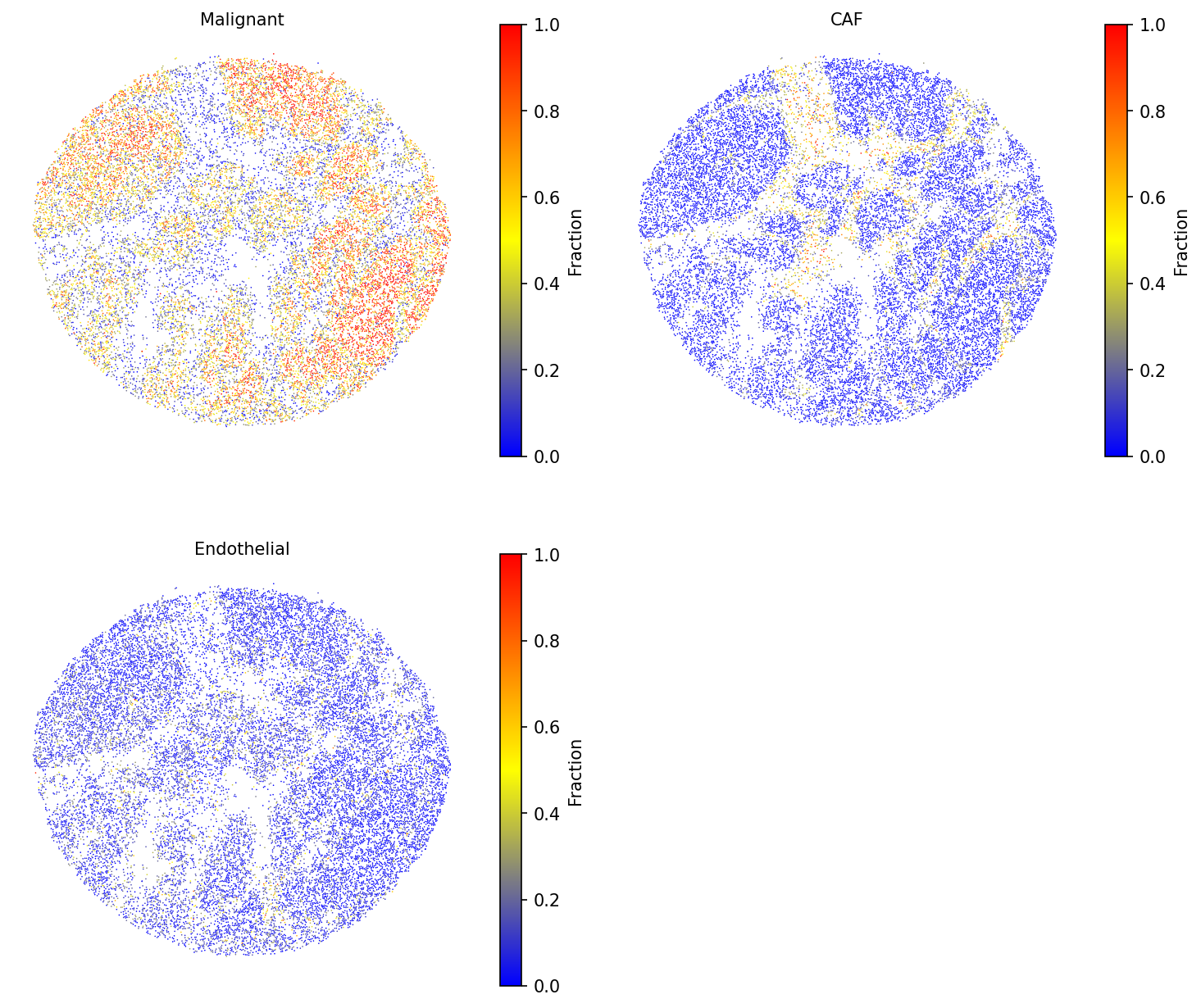
3a. Cell type fractions
Visualize selected cell-type fractions across the tissue. Use a smaller
point_size to accommodate the high density of Slide-seq beads.
# Visualize selected cell type fractions
spacet.visualize_spatial_feature(
    adata,
    spatial_type="CellFraction",
    spatial_features=["Malignant", "CAF", "Endothelial"],
    point_size=0.6,
    same_scale_fraction=True,
)
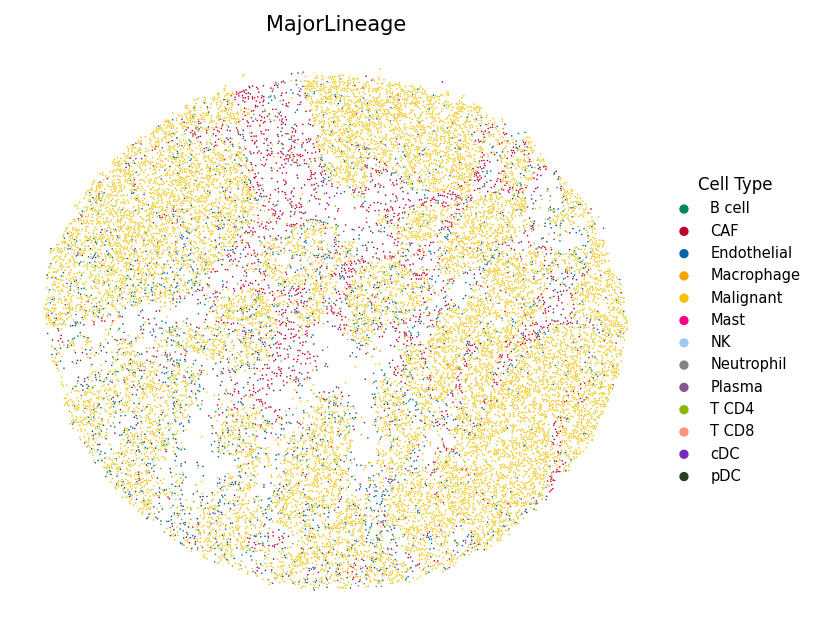
3b. Most abundant cell type
Assign each bead to its dominant cell type and display with custom colors to highlight the spatial organization of the tumor microenvironment.
import json

# Load color mapping (matching R tutorial's colors_vector.rda)
with open("data/hiresST_CRC/colors_vector.json") as f:
    colors_vector = json.load(f)

# Visualize the most abundant cell type per bead
spacet.visualize_spatial_feature(
    adata,
    spatial_type="MostAbundantCellType",
    spatial_features=["MajorLineage"],
    colors=colors_vector,
    point_size=0.6,
)
spacet.cci_colocalization()), interface identification
(spacet.identify_interface()), and gene set scoring
(spacet.gene_set_score()) using the same API demonstrated in
the Visium Breast Cancer tutorial and
Gene Set Score tutorial.
Session Info
import spatialgpu
print(f"spatial-gpu version: {spatialgpu.__version__}")

import anndata, numpy, scipy, pandas, matplotlib
print(f"anndata:     {anndata.__version__}")
print(f"numpy:       {numpy.__version__}")
print(f"scipy:       {scipy.__version__}")
print(f"pandas:      {pandas.__version__}")
print(f"matplotlib:  {matplotlib.__version__}")

try:
    import cupy
    print(f"cupy:        {cupy.__version__} (GPU backend available)")
except ImportError:
    print("cupy:        not installed (CPU-only mode)")